
Download Xylescope – Powerful CSS Analysis & Debugging Tool for Mac
Overview
Xylescope, developed by the renowned team at Culturedcode, is an innovative analysis and debugging tool specifically crafted for CSS designers who work on macOS. First introduced to our selection in 2005, the trial‑version program has steadily built a niche following among front‑end developers seeking a lightweight yet potent utility for inspecting, editing, and visualising Cascading Style Sheets in real time. The current version, 1.2.4, was refreshed on February 28 2009 and continues to run smoothly on macOS 10.5 and later, including earlier OS X releases.
Though the download numbers have dipped recently—zero downloads last week after a cumulative 523 since its debut—Xylescope remains a valuable addition to any developer’s toolbox because it occupies far less disk space than the average Development‑category application. Its core mission is to simplify the often‑tedious process of tracking selector specificity, inheritance, and cascade conflicts, allowing designers to focus on creative problem‑solving rather than endless debugging loops. With an intuitive interface, instant colour‑coded feedback, and a suite of real‑time inspection panels, Xylescope transforms the way you interact with CSS, making it easier to pinpoint errors, optimise performance, and maintain a clean stylesheet architecture.
Whether you are building responsive layouts, prototyping new UI components, or polishing a production‑ready website, Xylescope offers a free‑to‑try experience that demonstrates the power of a purpose‑built CSS inspector on macOS.
Key Features & Benefits
- Live Selector Highlighting: Hover over any element in the preview pane and instantly see which CSS rule is applied, with colour‑coded overlays that differentiate inherited, overridden, and active styles.
- Specificity Calculator: Built‑in algorithm displays the exact specificity score for each selector, helping you resolve cascade conflicts before they become bugs.
- Real‑Time Editing: Modify CSS values directly in the side panel; changes are reflected instantly in the preview without needing to refresh the page.
- Responsive Mode Simulation: Test how your stylesheet behaves across common device widths and orientations with a single click.
- Exportable Reports: Generate concise PDFs or JSON summaries of detected issues, ideal for sharing with teammates or documenting code reviews.
- Lightweight Architecture: The application occupies minimal storage, launches quickly, and runs efficiently even on older Mac hardware.
- Trial‑Only Restrictions: While the free version limits the number of saved projects, it provides full access to all core debugging tools, making it an excellent evaluation platform.
These features combine to create a workflow that reduces the time spent hunting down stray selectors or unintended overrides. By surfacing the cascade hierarchy visually, Xylescope eliminates guesswork, allowing developers to diagnose layout glitches in seconds rather than minutes. The specificity calculator, in particular, demystifies one of CSS’s most confusing concepts, empowering both junior and senior designers to write more predictable code.
Moreover, the real‑time editing capability means you can experiment with colour palettes, spacing, or font sizes on the fly, accelerating the design‑iteration loop. Because the tool is built exclusively for macOS, it integrates seamlessly with native system fonts and supports the standard keyboard shortcuts that Mac power users expect. In short, Xylescope’s feature set delivers a focused, distraction‑free environment that aligns perfectly with the needs of modern front‑end developers.
Installation, Usage & Compatibility
Step‑by‑Step Installation
Downloading Xylescope is straightforward. Visit the official Culturedcode download page, click the “Download Xylescope Trial” button, and the .dmg file will begin downloading automatically. Once the file is saved, double‑click to open the disk image, then drag the Xylescope icon into your Applications folder. macOS will prompt you to confirm that you trust the developer; simply click “Open” to complete the installation. Because the program is a trial version, no license key is required, but you will be reminded to purchase the full version if you exceed the project‑limit threshold.
Getting Started with the Interface
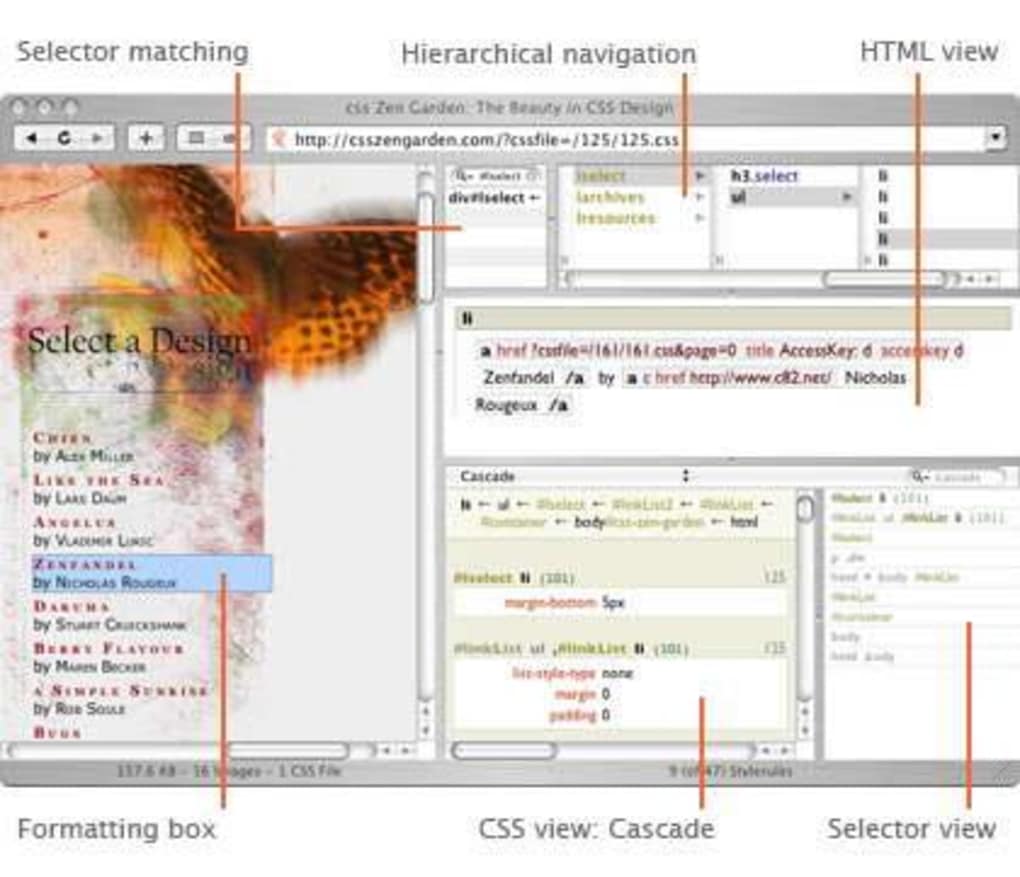
After launching Xylescope, you’ll be greeted by a clean window divided into three primary panels: the preview pane, the stylesheet list, and the inspector details. To begin, drag and drop any local HTML file or enter a remote URL into the address bar. Xylescope will parse the page, load all linked CSS files, and present a hierarchical view of selectors on the left. Clicking a selector instantly highlights the associated elements in the preview pane, while the inspector on the right displays computed values, specificity scores, and any overriding rules. Adjusting a property—such as margin or background‑color—updates the live preview instantly, allowing you to see the visual impact without reloading the page.
Compatibility
Xylescope is designed exclusively for macOS. It supports OS X 10.5 (Leopard) through the latest macOS releases, ensuring both legacy machines and newer Macs can run the tool without performance degradation. The application is built on 64‑bit architecture, which leverages modern CPU instructions for faster stylesheet parsing. Because it is a native Mac app, Xylescope integrates with the system’s Accessibility features, enabling keyboard‑only navigation for users who rely on assistive technologies. However, Windows, Linux, Android, and iOS users will need to seek alternative CSS inspection tools, as Xylescope does not provide cross‑platform binaries.
Pros & Cons, FAQ, and Final Verdict
Pros
- Extremely lightweight – minimal impact on system resources.
- Live selector highlighting and specificity calculator simplify debugging.
- Real‑time editing eliminates the need for manual refreshes.
- Responsive mode simulation built directly into the preview pane.
- Exportable reports aid in documentation and team communication.
Cons
- Only available for macOS; no Windows or Linux version.
- Trial version restricts the number of saved projects.
- Last official update was in 2009, so some modern CSS features may lack native support.
- No built‑in code linting beyond cascade inspection.
Frequently Asked Questions
Is Xylescope completely free?
Xylescope offers a free trial version with full access to debugging features, but it limits the number of projects you can save. To remove this restriction you need to purchase the full license.
Can Xylescope handle modern CSS Grid and Flexbox?
The core inspection engine supports most modern layout modules, including Flexbox and basic Grid features. However, because the last major update was in 2009, very new specifications may not be fully visualised.
Does Xylescope work with external style sheets loaded via CDN?
Yes. When you load a webpage, Xylescope fetches all linked CSS files, regardless of whether they are hosted locally or on a CDN, and incorporates them into the selector hierarchy.
Is there a way to export the inspection results?
The trial version allows you to generate PDF or JSON reports that summarise detected specificity conflicts, unused selectors, and other diagnostic information.
What are the system requirements for Xylescope?
Xylescope runs on macOS 10.5 (Leopard) and later, requiring at least 256 MB of RAM and 50 MB of free disk space for the application bundle.
Conclusion & Call to Action
In summary, Xylescope remains a compelling choice for macOS‑based CSS designers who value a lean, purpose‑built debugging environment. Its live highlighting, specificity calculator, and real‑time editing capabilities provide a clear advantage over generic browser dev tools when it comes to deep stylesheet analysis. While the lack of recent updates and the platform‑only limitation are notable drawbacks, the free trial offers enough functionality to evaluate whether the tool fits into your workflow. If you’re looking for a lightweight, secure way to debug CSS without clutter, download Xylescope today and experience a smoother, more visual approach to stylesheet management. Upgrade to the full version once you’ve confirmed its fit, and enjoy unrestricted project saving and ongoing support from Culturedcode.
Xylescope delivers a focused CSS debugging experience on macOS. Its live selector highlighting and specificity analysis are especially helpful for developers dealing with complex cascade issues. Although the UI feels a bit dated and the trial limits saved projects, the tool’s lightweight nature and exportable reports make it a worthwhile addition to any front‑end developer’s toolkit.







